
Gemini Spark is Google’s new background AI agent for India, available to Google AI Pro and Ultra subscribers. It can work on recurring or multi-step tasks through Gmail, Docs, Sheets and Calendar—even while your device is locked—while remaining under your direction. Google says it asks before high-stakes actions such as sending email or spending money.
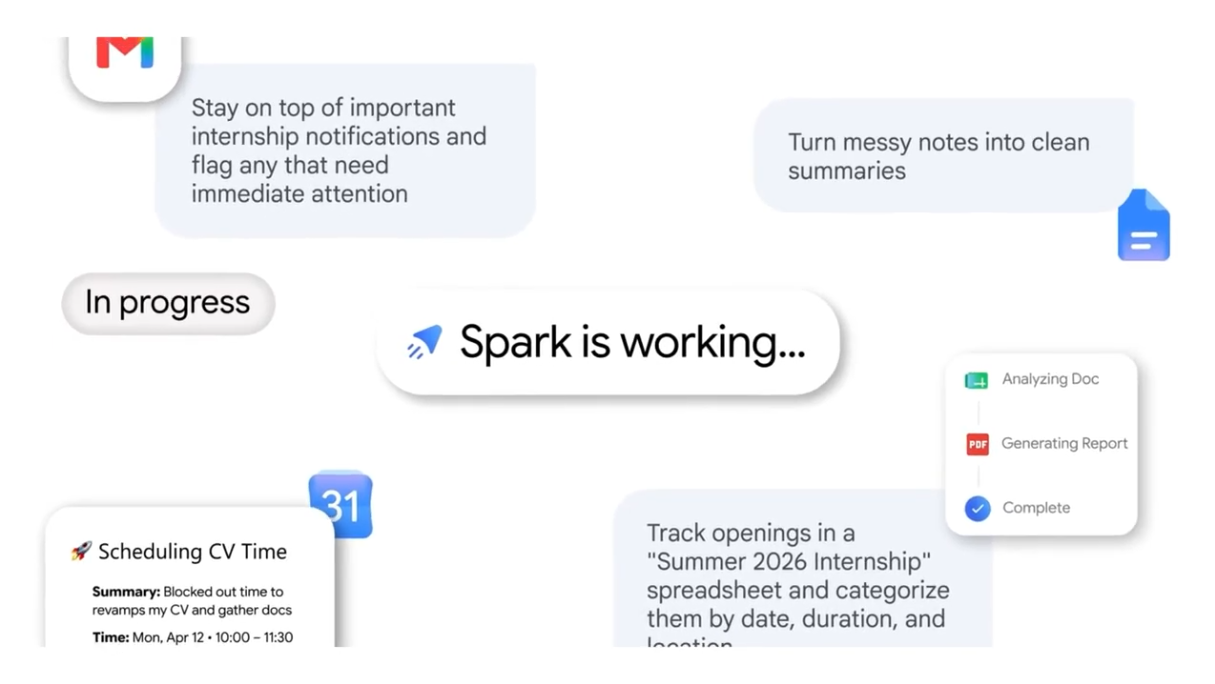
Gemini Spark availability at a glance
| Launch market | India |
|---|---|
| Announced | July 29, 2026 |
| Eligible plans | Google AI Pro and Google AI Ultra |
| Model | Gemini 3.6 Flash |
| Google integrations named | Gmail, Docs and Sheets; Google’s examples also use Calendar |
| Background operation | Google says it can continue when a laptop is closed or a phone is locked |
| Important control | You decide whether to enable it and which apps it can access |
Not seeing it? First confirm that the account is in India and uses an eligible Google AI Pro or Ultra subscription. Google’s announcement confirms the launch and plan eligibility but does not provide a universal activation deadline for every account, so availability may not appear identically for everyone on day one.
How to prepare before using Spark
- Use the correct Google account. Confirm it has an active Google AI Pro or Ultra subscription.
- Review connected apps. Only connect Gmail, Docs, Sheets or other services that the task genuinely needs.
- Start with a low-risk workflow. Ask Spark to collect information or create a draft before allowing actions that affect other people.
- Write clear approval boundaries. State what Spark may draft, add or monitor—and what must wait for your review.
- Check the first few runs. Review outputs, dates, recipients and source links before relying on a recurring task.
Google says the connections to Gmail, Docs and Sheets require no separate setup inside Spark, but users still choose whether Spark is enabled and which apps it can connect to.
Copy-paste Gemini Spark prompt template
Goal: [what you want completed]
Schedule or trigger: [when it should run]
Sources to use: [Gmail label, Sheet, Doc, website or app]
Output: [exact format and destination]
Rules: [what to include, exclude and verify]
Approval: Do not send, purchase, delete or publish anything without asking me first.
If uncertain: Save a draft and explain what needs my review.
12 useful Gemini Spark prompts
- Travel itinerary: “When a new flight or hotel confirmation reaches Gmail, extract the dates, booking reference, location and check-in details into my Travel Itinerary Sheet. Ask before changing any existing row.”
- Weekend planner: “Every Friday at 8 AM, find local events matching my interests and add the best options, prices and source links to my Weekend Plans Doc. Ask before adding anything to Calendar.”
- Subscription audit: “On the first day of each month, review last month’s digital invoices in Gmail. Flag price increases and trials nearing renewal, then draft—but do not send—cancellation emails.”
- Customer inquiry drafts: “Find new customer inquiries in Gmail, classify each by service requested and draft a factual reply using my approved pricing document. Never invent a price or send the email.”
- Meeting action tracker: “After a meeting-notes document is created, extract owners, actions and deadlines into my Action Tracker Sheet. Mark ambiguous deadlines for review.”
- Invoice follow-up: “Every weekday, check my invoice tracker for overdue items and prepare a polite follow-up draft. Do not contact anyone until I approve it.”
- Content research digest: “Every Monday, collect official announcements from the source list in my Research Doc and summarize only new items with publication dates and links.”
- Inbox triage: “Each morning, group unread mail into urgent, reply needed, waiting and newsletter. Create a summary Doc; do not archive, delete or send anything.”
- Event RSVP organizer: “Find RSVP emails, put attendee names and stated dietary requirements into a Sheet, and flag duplicates or unclear responses.”
- Price-change monitor: “Check the product pages listed in my Sheet each Tuesday. Record visible price changes with the page URL and date; do not make purchases.”
- Writing-style guide: “Review my last 50 sent emails and create a style guide covering tone, greeting, sentence length and sign-off. Do not expose private message content in the final guide.”
- Weekly business dashboard: “Every Friday, summarize the approved metrics in my reporting Sheet, identify missing data and draft a five-bullet update. Do not estimate missing numbers.”
Safety and privacy checklist
- Grant the minimum app access needed for the task.
- Keep human approval for payments, outbound messages, deletions and publishing.
- Do not place passwords, card details or recovery codes in prompts.
- Require source links and dates for research tasks.
- Tell Spark not to estimate or invent missing facts.
- Review recurring automations after changing documents, labels or account permissions.
These are practical operating safeguards, not claims that an AI agent cannot make mistakes. Google’s specific launch safeguard is that Spark is designed to ask first before high-stakes actions such as spending money or sending emails.
FAQ
What is Gemini Spark?
Gemini Spark is a background AI agent from Google that can carry out recurring and multi-step digital tasks under the user’s direction. Google says it can keep working when a laptop is closed or a phone is locked.
Is Gemini Spark available in India?
Yes. Google announced Gemini Spark for India on July 29, 2026. Google’s launch post says it is available to Google AI Pro and Ultra subscribers.
Is Gemini Spark free?
Google’s launch announcement lists Gemini Spark for Google AI Pro and Ultra subscribers, not free-tier users.
Which Google apps work with Gemini Spark?
Google says Spark connects natively with Gmail, Docs and Sheets. Its official examples also include Calendar workflows.
Can Gemini Spark send emails or spend money without asking?
Google says Spark is designed to ask first before high-stakes actions such as sending emails or spending money. Users choose whether to turn it on and which apps it can access.
What model powers Gemini Spark?
Google says Gemini Spark is driven by Gemini 3.6 Flash.
Official source
- Google India: Introducing Gemini Spark—Your 24/7 personal AI agent in India (published July 29, 2026)