
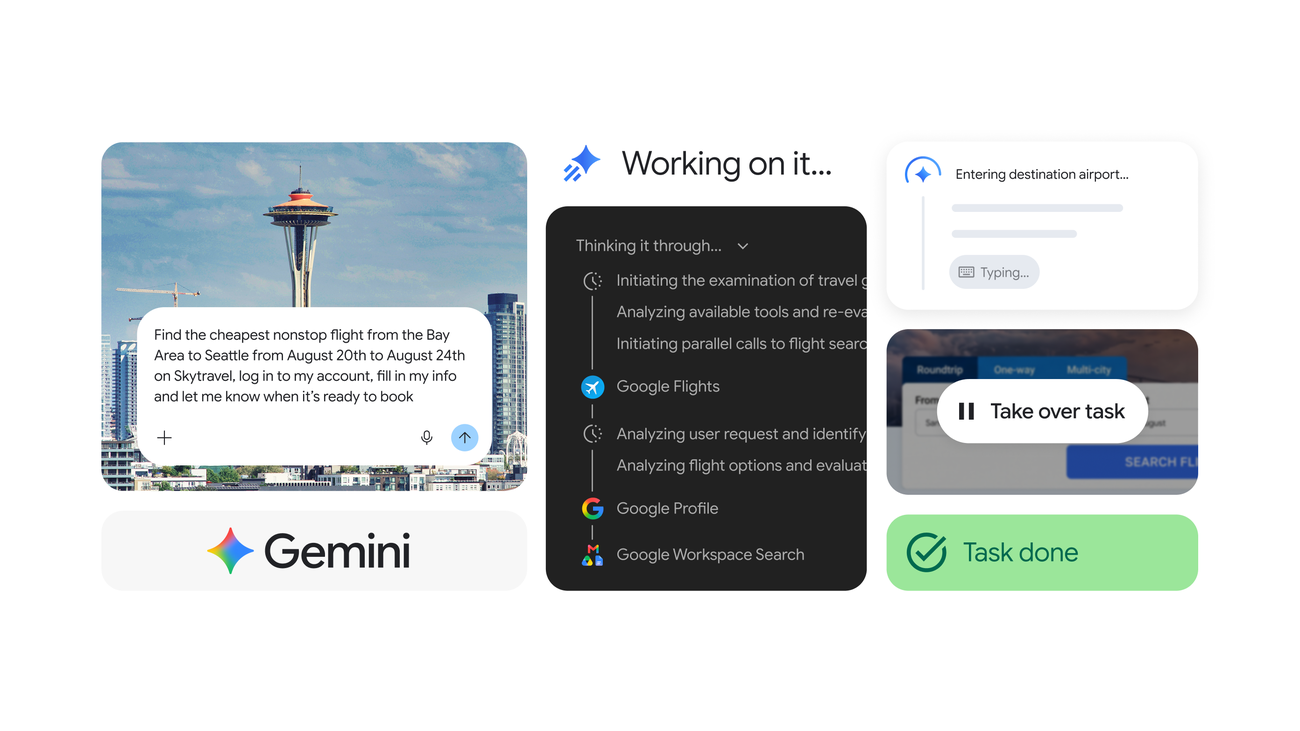
Gemini Spark now integrates with Chrome to handle multi-step web errands using your logged-in accounts and saved passwords—with your permission. Google says the new Chrome capability is initially rolling out in the United States. Spark itself is also expanding to Google AI Pro subscribers in more than 160 additional countries, but that broader expansion does not mean Chrome auto browse is immediately available in every one of those countries.
Gemini Spark Chrome availability at a glance
| Feature | Official availability detail |
|---|---|
| Chrome web errands | Initially rolling out in the U.S.; Google plans additional regions later |
| Broader Spark access | Rolling out to Google AI Pro subscribers in more than 160 additional countries |
| Account access | Can use logged-in accounts and saved passwords only with your permission |
| Payments | Google says sensitive actions such as payments are handed back to the user |
| Announced | July 30, 2026 |
Important distinction: Google announced two rollouts in the same update. General Spark access is expanding internationally, while the new Chrome web-browsing capabilities begin in the U.S.
What Spark can do through Chrome
Google’s announcement gives two concrete examples:
- Apartment search: schedule viewings for apartments you have saved.
- Travel research: research flight options and start the booking process.
These are agentic tasks: Spark can move through multiple web steps rather than merely summarize a page. Google also says it has protections against threats such as prompt injection and keeps users involved in sensitive actions.
Chrome auto browse readiness checklist
- Confirm region and plan. The Chrome capability starts in the U.S. Google’s broader announcement names Google AI Pro for the international Spark expansion.
- Look for the feature in your own account. A rollout can reach accounts gradually; the announcement does not promise the same activation time for every eligible user.
- Start with a reversible task. Use research or form preparation before allowing an agent to work with bookings or account changes.
- Review the task boundary. Specify which sites, accounts and saved items Spark may use.
- Keep final approval for consequential actions. Personally verify names, dates, totals, cancellation terms and recipients.
- Stop if a page asks for unexpected credentials. Do not paste recovery codes, one-time passwords or card details into prompts.
This checklist is practical guidance, not a claim that an AI agent cannot make mistakes.
Copy-paste task template
Goal: [the web errand to complete]
Use only: [approved websites/accounts]
Find: [exact criteria, dates, budget or location]
Do not: purchase, submit, send, cancel or change an account
Stop and ask me before: payment, final submission or accepting terms
Return: options, total cost, key conditions and source links
If anything is unclear: pause and explain what needs review
3 low-risk ways to test it
1. Compare flights without purchasing
Research flight options from [origin] to [destination] for [dates]. Compare the final displayed fare, baggage terms and change conditions. Do not enter payment details or complete a booking.
2. Organize apartment viewings
Review the apartments I saved, group them by neighborhood and prepare a proposed viewing schedule. Show me the plan before contacting anyone or confirming a time.
3. Build a purchase shortlist
Compare these products using the seller pages I provide. Return current displayed price, delivery estimate, return terms and page link. Do not add items to a cart or buy anything.
Privacy and security checks before granting access
- Use the minimum account access needed for the errand.
- Do not expose recovery codes, private keys or one-time passwords.
- Review the exact item, date, recipient and total before taking over a payment or submission.
- Treat instructions found on web pages as untrusted if they conflict with your task.
- Remove access or end the task when the errand is complete.
Google specifically links its Spark announcement to information about its approach to agentic security and prompt-injection defenses.
FAQ
What can Gemini Spark do in Chrome?
With permission, Google says Spark can use logged-in accounts and saved passwords to handle web errands. Examples include scheduling apartment viewings and researching flights before starting the booking process.
Where is Gemini Spark Chrome auto browse available?
The Chrome capabilities are initially rolling out in the United States. Google says more regions will follow.
Can Spark complete a payment by itself?
Google says sensitive actions such as payments are handed back to the user.
Do all Google AI Pro countries get Chrome auto browse immediately?
No. General Spark access is expanding to AI Pro subscribers in more than 160 additional countries, but Google separately limits the initial Chrome rollout to the U.S.
Official sources
- Google: Gemini Spark now integrates with Chrome — published July 30, 2026
- Google Gemini Help: supported countries and territories
- Google Security Blog: security for agentic systems