
Direct answer: Google Workspace admins should review Google Meet’s new automatic note-taking setting before September 21, 2026. Google says the “3+ guests” option will be on by default for Business Standard and Business Plus, but off by default for Enterprise Standard, Enterprise Plus, Frontline Plus and organizations using the Google AI Pro for Education add-on. Google says the setting will not affect end users before September 21.
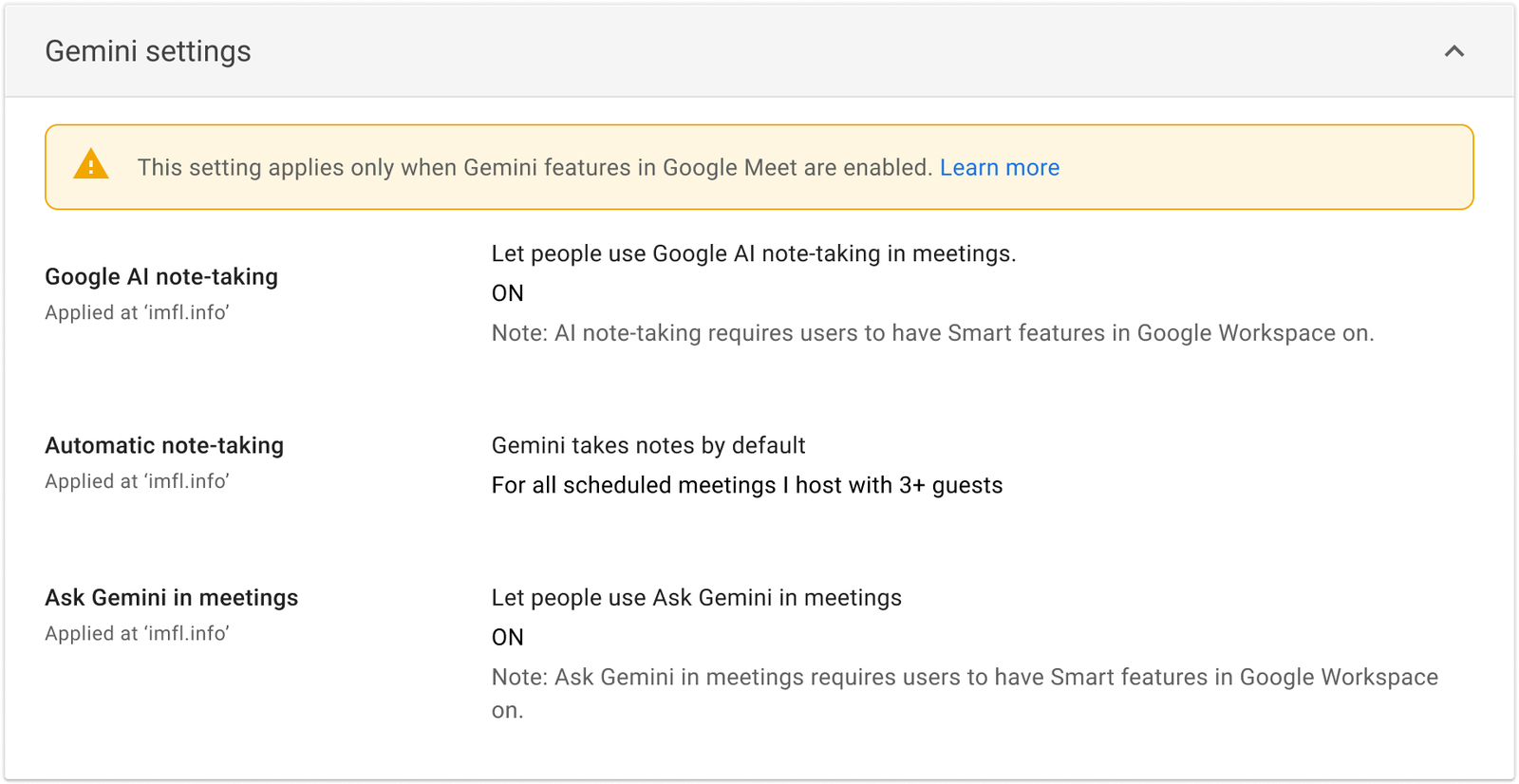
Five-minute admin action: Open Admin console → Apps → Google Workspace → Google Meet → Gemini settings → Automatic note-taking. Choose Off, all scheduled meetings, or scheduled meetings with 3+ guests; then save and document the decision. The host counts toward the three-person threshold.
What is changing in Google Meet?
Admins previously had an on-or-off choice for automatic note-taking across meetings. Google is adding a third option: automatically use “Take notes for me” only for scheduled meetings with three or more guests, including the host. Google’s official announcement says the admin setting is rolling out to Rapid and Scheduled Release domains, with expected completion by August 3, 2026.
| Google Workspace edition | Default for the new 3+ guests setting | Admin action |
|---|---|---|
| Business Standard | On | Review before September 21 if automatic notes are not appropriate for every qualifying meeting. |
| Business Plus | On | Review before September 21 if automatic notes are not appropriate for every qualifying meeting. |
| Enterprise Standard / Plus | Off | Leave off or enable deliberately after privacy, retention and sharing review. |
| Frontline Plus | Off | Leave off or enable deliberately after reviewing user needs. |
| Google AI Pro for Education add-on | Off | Review institutional policy before enabling. |
| Gemini Alpha participants | May reflect an earlier test configuration | Check the current state rather than assuming a default. |
Important: “On by default” does not mean the behavior changes immediately. Google says admin defaults will go into effect for end users no sooner than September 21, 2026. Google also says users will be able to override the admin default in their own Meet settings after that date.
Admin setup: step by step
- Sign in to the Google Admin console with the Google Meet administrator privilege.
- Go to Apps → Google Workspace → Google Meet.
- Open Gemini settings, then select Automatic note-taking.
- If required, select an organizational unit or configuration group. Google notes that group settings override organizational units.
- Choose Off, For all scheduled meetings I host, or For all scheduled meetings I host with 3+ guests.
- Click Save. Google says changes can take up to 24 hours, although they often apply sooner.
- Record the chosen setting, scope, approver and review date in your Workspace change log.
Pre–September 21 review checklist
- Confirm the edition and default: Do not assume every Workspace plan has the same starting state.
- Check organizational units and groups: Decide whether departments such as HR, legal, healthcare, education or customer support need different defaults.
- Review note sharing: Google Meet can share notes with all invited guests, invited guests inside the organization, or hosts and co-hosts only. Confirm the appropriate default for sensitive meetings.
- Review retention: Meeting notes are organized in Google Docs. Align Drive access, retention and Google Vault rules with your records policy.
- Inform hosts: Explain when notes start automatically, how to stop them, and what participant notification or consent practices your organization requires.
- Test with a non-sensitive meeting: Validate language, sharing, Calendar links, recap email and access permissions before broad use.
- Recheck after rollout: Verify the live behavior after September 21 rather than relying only on the saved admin selection.
This checklist is operational guidance, not legal advice. Organizations should apply their own privacy, employment, education, healthcare, financial-services and recording-consent requirements.
How end users can choose their own default
When the user control is available, a meeting host can open meet.google.com, select Settings → Meeting records, and choose an option under automatic note-taking: Off, all scheduled meetings they host, or scheduled meetings they host with 3+ guests. Google says rollout of the end-user setting will begin no sooner than September 21 and may take up to 15 days for visibility.
Google’s help page currently lists eight supported languages: English, French, German, Italian, Japanese, Korean, Portuguese and Spanish. It says one language is supported at a time; a meeting with multiple spoken languages is not currently supported.
What “Take notes for me” produces
- Meeting notes organized in a Google Doc.
- A “Summary so far” option for a participant who joins late.
- A recap link emailed to the organizer after the meeting.
- A recap link in the Google Calendar event.
For meetings they host, users can adjust note language and sharing in Google Calendar or during the Meet call. Google’s sharing choices include all invited guests (including external guests), invited guests in the organization, or hosts and co-hosts only.
FAQ
When does the new Google Meet note-taking default take effect?
Google says there will be no end-user impact before September 21, 2026. The end-user setting rollout is scheduled to begin no sooner than that date, with Google promising a further Workspace Updates post when it begins.
Does “3+ guests” include the host?
Yes. Google’s admin documentation says the host is included in the three-or-more-guest threshold.
Can a user override the administrator’s default?
Google says end users can override the admin default in their Meet settings after the user control rolls out. Admins should still confirm how organizational policy applies to that choice.
Is automatic note-taking available on every Google Workspace plan?
No. Google lists Business Standard and Plus, Enterprise Standard and Plus, Frontline Plus, and the Google AI Pro for Education add-on for this rollout. The feature also requires an eligible Workspace edition or Google AI plan.
Official sources
- Google Workspace Updates: new admin and end-user settings
- Google Workspace Admin Help: manage automatic note-taking
- Google Meet Help: Calendar and Meet settings for Take notes for me
Last checked: July 21, 2026. Google’s Admin console and current help documentation take precedence because rollout timing and controls can change.