
Google’s redesigned Classroom homepage starts rolling out globally on July 27, 2026. It adds role-based dashboards for teachers, students, and administrators. There is no switch to disable the new homepage, and Google says the full rollout should take 1–3 days for both Rapid Release and Scheduled Release domains.
Google Classroom new homepage: quick rollout checklist
- Mark July 27–30: Google expects visibility within 1–3 days from the July 27 start.
- Tell users where classes went: classes remain available in the side navigation and in a classes module on the homepage.
- Brief each audience: teachers, students, and administrators see different dashboard modules.
- Review Gemini access by organizational unit: Gemini-related modules appear only where the relevant services are enabled.
- Prepare for no opt-out: Google provides no admin or end-user control for the redesigned homepage.
- Ask multi-role users to check their view: they can switch between Teaching, Enrolled, and Admin roles where applicable.
- Show users how to collapse modules: every new homepage module can be collapsed to reduce clutter.
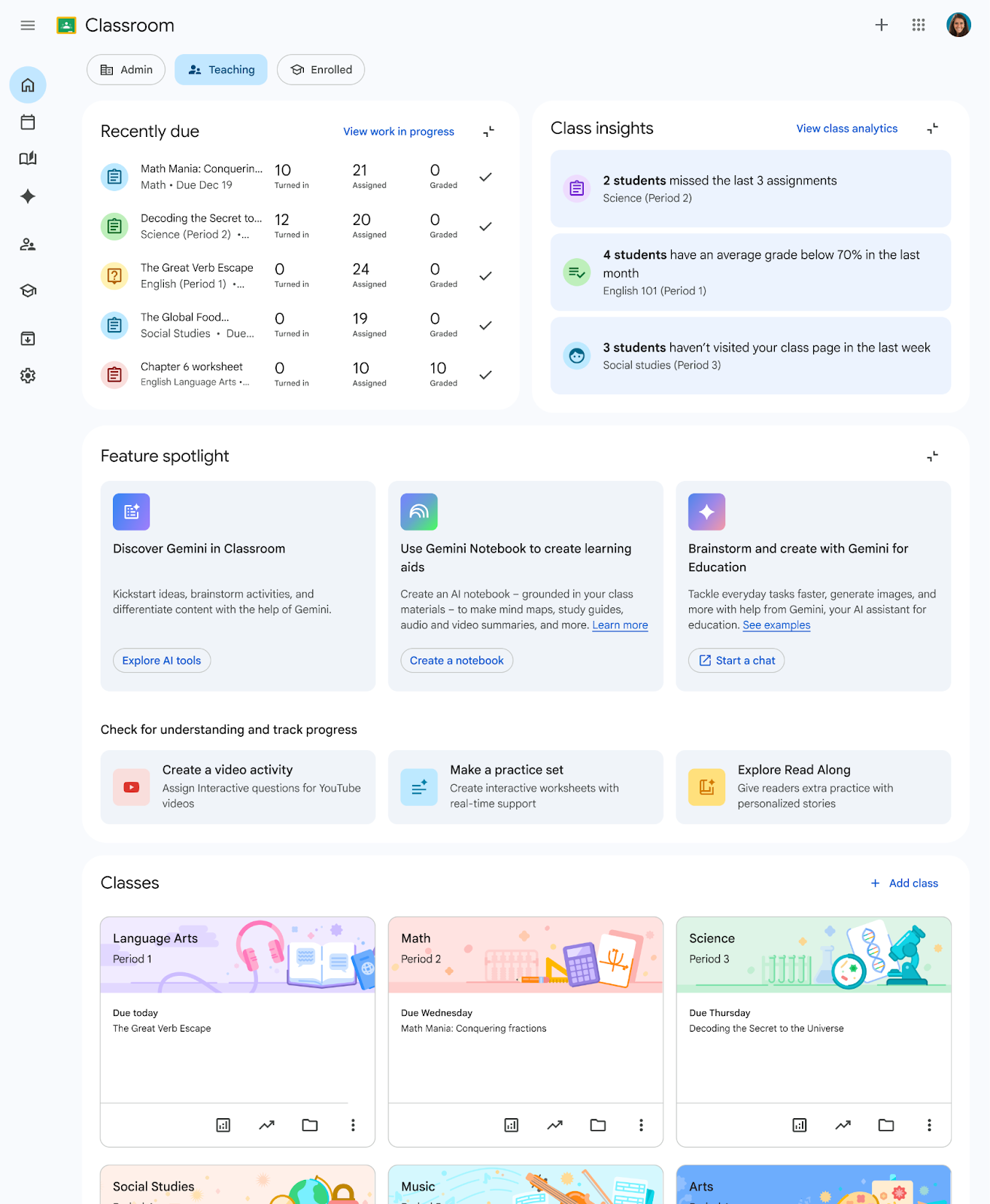
What changes for teachers, students, and admins?
| Role | What the new homepage shows | What to do first |
|---|---|---|
| Teachers | Actionable insights, student classwork interactions, assignment-completion tracking, classes, and feature discovery. | Check that assignment data looks expected and show staff where to find classes and due-work signals. |
| Students | An Enrolled view with coursework due soon and deadline reminders. | Teach students to use the due-soon area as a prompt, while still opening each class for full instructions. |
| School leaders and IT admins | High-level performance analytics, administrative shortcuts, and relevant tools for supporting staff. | Confirm role assignments and review which services are enabled for each organizational unit. |
| Multi-role users | Role switching among views such as Teaching, Enrolled, and Admin. | Use the role selector when the expected dashboard is not visible. Classroom returns to the previously used role view on the next visit. |
Availability depends on the user’s role, account type, feature access, and settings. That means screenshots and modules may differ between users in the same institution.
Admin preparation before July 27
1. Review Gemini service access
The homepage itself cannot be turned off. However, Gemini in Classroom, the Gemini app, and Gemini Notebook features appear only when the user belongs to an organizational unit where those services are enabled. Review service access before sending screenshots or instructions to staff; otherwise, users may expect modules they are not eligible to see.
2. Send a short change notice
Copy-and-paste notice: Google Classroom is introducing a role-based homepage beginning July 27, 2026. Your classes are still available from the left navigation and the Classes module. Teachers, students, and administrators may see different dashboard cards. If you have more than one role, use the role selector to change views. You can collapse any homepage module you do not need.
3. Update internal help material
- Replace old homepage screenshots after the rollout reaches your domain.
- Keep class-specific instructions unchanged unless they rely on the old homepage layout.
- Add a note explaining that dashboard modules vary by role and account eligibility.
- Point staff to Google’s official Navigate your Classroom Homepage guide.
Rollout date and availability
- Start date: July 27, 2026
- Pace: full rollout, with 1–3 days for visibility
- Release tracks: Rapid Release and Scheduled Release
- Availability: all Google Workspace customers, Workspace Individual subscribers, and personal Google accounts
- Admin control: none for the homepage itself
- End-user setting: none for the homepage itself
What is not changing?
The redesign centralizes information and tools; it does not remove access to classes. Users can continue to open classes from the side navigation panel or the dedicated classes module. Google’s announcement also describes existing information being surfaced in one place, so schools should avoid promising that every dashboard card represents a completely new capability.
Frequently asked questions
When does the new Google Classroom homepage launch?
The rollout starts July 27, 2026, for both Rapid Release and Scheduled Release domains. Google says visibility should take 1–3 days.
Can admins turn off the new homepage?
No. Google says there is no admin control for the new Classroom homepage. There is also no end-user setting to disable it.
Why do two users see different homepage modules?
The dashboard is tailored by role and available features. Account type, organizational-unit settings, and access to services such as Gemini can change what appears.
Where are my Google Classroom classes?
Classes remain accessible from the side navigation panel and a dedicated classes module on the redesigned homepage.
Can users hide dashboard sections?
Users can collapse all new homepage modules, although they cannot switch off the redesigned homepage itself.
Official sources
- Google Workspace Updates: Redesigned Google Classroom homepage (July 21, 2026)
- Google Classroom Help: Navigate your Classroom Homepage
Last checked: July 22, 2026. Google may adjust rollout timing or feature availability; consult the official update links above for changes.