
Quick answer: On a compatible device running version 27 software, open Settings (or System Settings) → Siri → Try Siri AI (Beta). If Siri is off, turn it on first. Complete voice enrollment and the privacy review, then wait while Apple approves access and downloads Siri AI. Apple says wait times can vary.[2]
Five checks before you start
- Install iOS 27, iPadOS 27, macOS 27 Golden Gate, watchOS 27 or visionOS 27.
- Confirm the device supports Apple Intelligence.
- Set the device language and Siri language to the same supported language; Siri AI currently supports English.
- Check regional availability: iPhone, iPad and Apple Watch access is not currently available for EU residents, and mainland China restrictions apply.
- Keep enough free storage: Apple lists up to 8 GB for many devices, up to 14 GB for its higher-capability group, and up to 1.5 GB on Apple Watch.[3]
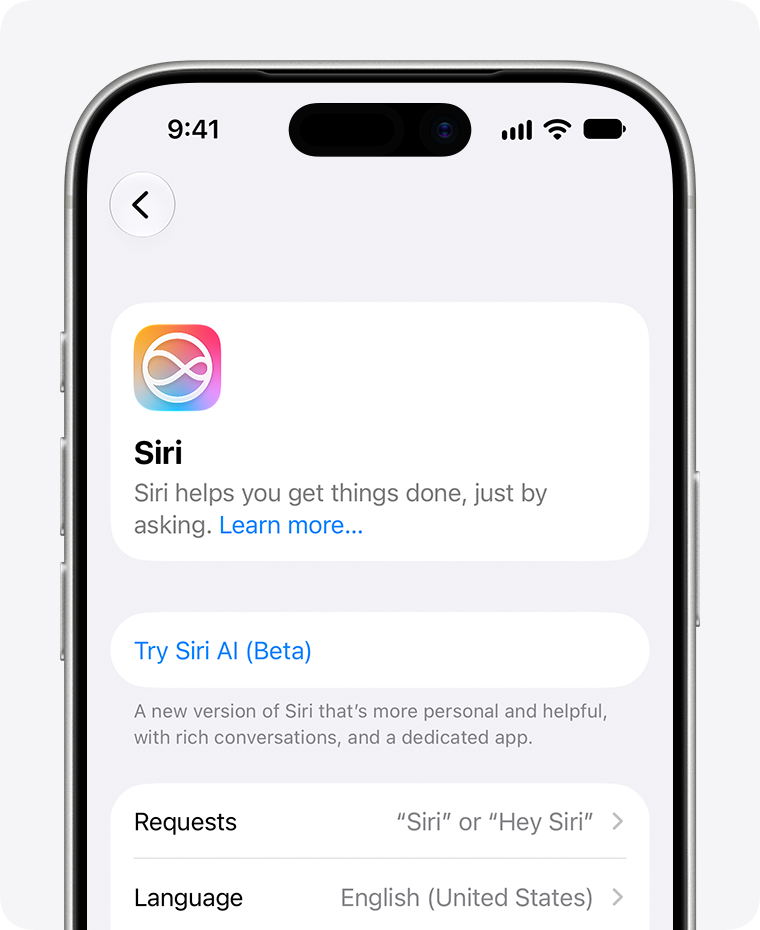
How to enable Siri AI
- Back up and update: install the latest version 27 update for your device.
- Open Siri settings: use Settings → Siri on iPhone or iPad, or System Settings → Siri on Mac.
- If prompted, select Turn On Siri.
- Select Try Siri AI (Beta).
- Choose a voice, complete voice enrollment and review the privacy settings.
- Wait for approval and the automatic download. Apple explicitly says enrollment adds the account to a waitlist and wait times vary.[2]
- After activation, test Siri with the side button or “Hey Siri.” On iPhone, you can also swipe down from Dynamic Island; the dedicated Siri app keeps conversation history synced through iCloud.[1]
Siri AI compatible devices
| Platform | Apple’s listed requirement |
|---|---|
| iPhone | iPhone 15 Pro models and later qualifying models, iPhone 16 models or later, and iPhone Air |
| iPad | iPad mini (A17 Pro) or iPad with M1 or later |
| Mac | MacBook Neo (A18 Pro) or Mac with M1 or later |
| Apple Watch | Series 9 or later, Ultra 2 or later, or SE 3, paired with an Apple Intelligence-enabled iPhone with Siri AI enabled |
| Apple Vision Pro | Any Apple Vision Pro |
Running iOS 27 alone is not enough. In particular, the base iPhone 15 and iPhone 15 Plus are not in Apple’s listed Siri AI requirements.[2]
Siri AI not showing? Check these seven causes
1. The hardware is not eligible
Check the exact model—not just whether it can install iOS 27. An older device can receive the operating-system update without qualifying for Siri AI.
2. Version 27 is not installed
Siri AI requires iOS 27, iPadOS 27, macOS 27 Golden Gate, watchOS 27 or visionOS 27.[2]
3. Device and Siri languages do not match
Apple requires both language settings to use the same supported language. Siri AI is currently available in English, even though other Apple Intelligence features support a broader language list.[2]
4. The region is restricted
For EU residents, Apple says Siri AI is not available on iOS, iPadOS or watchOS. It can work on supported Macs and Apple Vision Pro when both language settings are English. Siri AI also does not currently work when the Apple Account region is mainland China.[2]
5. The waitlist or download is still pending
Selecting Try Siri AI (Beta) does not guarantee instant activation. Apple says wait times vary and the assistant downloads automatically when the wait is complete.[2]
6. The device needs more free storage
Apple Intelligence requires substantial on-device storage. Apple lists up to 8 GB on many supported devices, up to 14 GB for the higher-capability device group, and up to 1.5 GB on Apple Watch.[3]
7. You expect an advanced feature on baseline hardware
Baseline Siri AI compatibility does not guarantee every advanced feature. Apple says expressive voice customization needs newer hardware, including iPhone Air, iPhone 17 Pro models, iPhone 18 Pro models, certain iPads and Macs with at least 12 GB of unified memory, and Apple Vision Pro (M5).[2]
Avoid destructive troubleshooting: do not reset the device or use unofficial region workarounds before checking hardware, software, language, region, waitlist and storage eligibility.
What Siri AI adds
Apple describes Siri AI as a beta assistant with personal-context understanding across supported apps, onscreen awareness, app actions, web-backed answers, writing support, Visual Intelligence and a dedicated Siri app that syncs conversation history through iCloud.[1][2]
- Personal context: find relevant information across messages, email, photos and supported apps.
- Onscreen awareness: ask about or act on content already visible.
- App actions: create events, send messages and complete supported cross-app tasks.
- Writing support: draft, edit or get feedback where Siri writing tools are available.
- Visual Intelligence: ask about images, screenshots or the camera view on supported platforms.
- Conversation continuity: use the dedicated Siri app and sync history through iCloud.
The broader Apple Intelligence release also adds advanced photo editing, Safari tools, Image Playground, natural-language shortcuts and other capabilities. Feature availability differs by platform, language and region.[3]
Important limits before you rely on it
- It is a beta: behavior and availability can change.
- It is not global: language and region restrictions remain.
- Usage is not necessarily unlimited: some server-side Apple Intelligence features, including Siri AI, have daily limits that can vary with complexity, demand and policy.
- Expanded access may cost money later: Apple says expanded access will be offered for a fee but gives no universal price on the cited pages.
Apple launched Siri AI in English and announced French, Japanese, Korean, Portuguese and Spanish for the following month. Check Apple’s current support page rather than assuming a language has arrived.[1][3]
Frequently asked questions
Where is the Siri AI switch?
Open Settings → Siri → Try Siri AI (Beta). If Siri is disabled, turn it on first.[2]
Is Siri AI automatically enabled after installing iOS 27?
No. Apple’s setup instructions require eligible users to select Try Siri AI (Beta), finish setup and join the waitlist.[2]
Why is Siri AI missing on an iPhone 15?
Apple supports the iPhone 15 Pro and iPhone 15 Pro Max, but its requirements do not list the base iPhone 15 or iPhone 15 Plus.[2]
Does Siri AI work in the EU?
For EU residents, Apple says Siri AI is not available on iOS, iPadOS or watchOS. It is available on supported Macs and Apple Vision Pro when the device and Siri languages are both English.[2]
How much storage does Apple Intelligence need?
Apple lists up to 8 GB on many supported devices, up to 14 GB on a higher-capability device group, and up to 1.5 GB on Apple Watch.[3]
Is Siri AI free?
The current beta is included on eligible devices, but server-side features can have daily limits. Apple says expanded access will be available for a fee in the future, without giving a universal price on the cited support page.[3]
Last checked: September 27, 2026. Availability can change during the beta.
Official sources
- Apple Newsroom: Siri AI is here
- Apple Support: How to get Siri AI
- Apple Support: How to get the next generation of Apple Intelligence